Your Shopify App Pile Is Costing You Money and Milliseconds. Audit It.
Table of contents: 7 sections
Nobody sits down and decides to run thirty-eight apps. The pile grows one impulse at a time. A discount timer for a Black Friday you ran two years ago. An upsell widget someone recommended in a Slack group. A review importer you installed during a migration and never touched again. Each install felt free or close to it, so nobody flagged it. That's the trap.
Of the 26,681 Shopify apps we track at MerchantPick, 65% offer a free plan. When the price of adding one is basically zero, the friction that would normally make you think twice disappears. So the pile grows quietly, and the real cost surfaces later: on your card statement, in your page load time, and in the tangle of overlapping tools that all half-do the same job.
An audit fixes it. Not a vague "we should clean this up someday" but a scheduled, mechanical pass with clear rules for what stays and what dies. Here's how I run one.
1. Inventory everything, including the stuff you forgot exists
Open your Shopify admin, go to Settings, then Apps and sales channels, and pull up the full installed list. Don't skim it. Put every app into a spreadsheet with five columns: name, what it actually does, monthly cost, who asked for it, and the last time anyone opened it.
Writing the real function in plain words is where the first surprises land. You'll type "currency converter" and realize your theme already does that. You'll hit an app whose name means nothing to you and whose purpose you cannot describe. Flag those immediately. An app nobody on the team can explain is an app nobody is using.
While you're in there, check the billing side too. Shopify charges app fees through your store, so the numbers already sit on your monthly statement. Add them up before you go further. Merchants routinely find they're paying a few hundred dollars a month across a dozen subscriptions, and a third of that is for things they'd forgotten were running.
2. Group by function and stare at the overlap
Now sort the spreadsheet by that "what it does" column so similar tools sit next to each other. This is the step that exposes the waste, because bloat rarely looks like one obviously useless app. It looks like three apps quietly splitting one job.
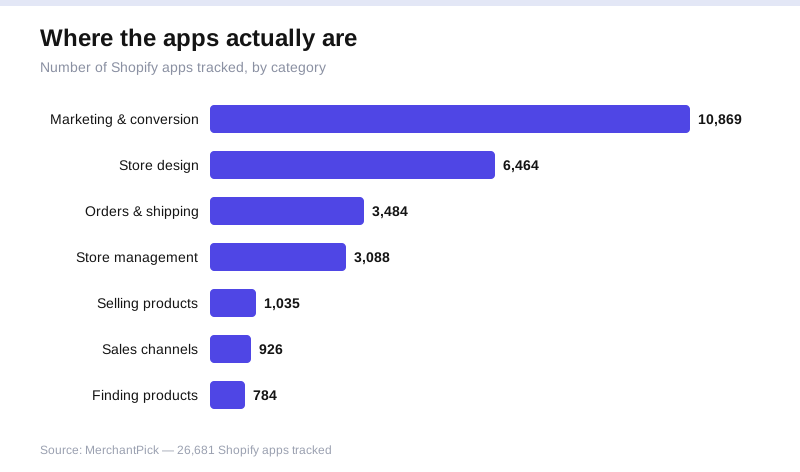
Overlap clusters hardest in the biggest categories, and that's no accident. Marketing and conversion is the largest category we track at 10,869 apps, with store design close behind at 6,464. When that many near-identical tools compete for the same slot, you end up with a popup app, an email app that also does popups, and a landing-page builder that also does popups. Three subscriptions, three scripts loading, one actual function.
Same story with reviews, upsells, and trust badges. Merchants collect these like loyalty stamps. Put every app that touches conversion in one group and every app that touches design in another, then ask the blunt question for each cluster: if I kept only one of these, which would it be? The answer is usually obvious the moment you're forced to pick.
3. Judge each app on real usage, not on how it felt when you installed it
For every app still standing, you need a yes to one question: is this earning its keep right now? Not "could it be useful", everything could be useful. Right now.
Three tests. First, usage: when did anyone last open its dashboard or change a setting? If the honest answer is "months ago," it's running on autopilot and you can't even say what it's doing. Second, attributable value: can you point to revenue, saved hours, or a real function tied to it? An upsell app should show you upsell revenue. If it can't, or you never look, that's your answer. Third, redundancy: does your theme, Shopify's native features, or another app you're keeping already cover this?
Be ruthless about the set-it-and-forget-it apps specifically. Those feel safe to keep because they're not in your way. But an app you never open is one you're not maintaining, not monitoring, and not questioning. It's pure liability with a monthly fee attached.
4. Weigh the performance cost, the bill you don't see
The subscription fee is the obvious cost. The one that actually hurts is what apps do to your storefront speed. Many of them inject JavaScript and CSS into every page load, whether or not that page uses the app. A popup app runs its script on your checkout. A review widget loads its bundle on pages that have no reviews.
Run your storefront through PageSpeed Insights or WebPageTest and look at the third-party requests. Cross-reference those domains against your app list. You'll often find a couple of apps responsible for an outsized share of the blocking scripts. A slow store loses sales and rankings quietly, so this cost never lands on a statement, which is exactly why it goes unaudited for years.
Some apps also leave code behind after you uninstall them: orphaned snippets in theme.liquid, leftover script tags, dead Liquid blocks. Note which apps have injected theme edits now, so you know what to clean up later. This is the single most-skipped part of an app cleanup, and the reason "I removed it" often doesn't mean the weight actually left.
5. Remove, and remove properly
Uninstalling is not deleting. When you remove an app, Shopify strips its main integration, but the theme code it added can linger, and so can data it wrote into your store.
Work off your kill list in order of confidence. Duplicates first, then the never-opened, then the can't-explain-what-it-does group. Before each removal, if the app touched your theme, duplicate the theme as a backup so you have a clean rollback. Then uninstall, and afterward open your live theme code and search for the app's name or its script tags. Delete what it left behind. Reload key pages and confirm nothing broke visually.
Don't try to strip twenty apps in one sitting and push it all live at once. If something breaks, you won't know which removal caused it. Do them in small batches, publish, watch your store for a day, then continue. Boring and reversible beats fast and mysterious.
6. Set a cadence so the pile never rebuilds
A one-time cleanup buys you a few clean months, and then the drift starts again, because the thing that caused the pile hasn't changed. Adding an app is still nearly frictionless, and with roughly two-thirds of the catalog offering a free plan, the temptation to "just try this one" never goes away.
So install a rule. Put a recurring calendar block every quarter to rerun the inventory. It takes twenty minutes once the habit is set, because you're reviewing a handful of new installs, not years of sediment. Add one more rule going forward: no new app goes in without a note on why it's there and a date to check whether it earned its place. A trial you don't schedule a review for is just a subscription you forgot to cancel.
The point isn't a smaller number
You're not chasing a low app count for its own sake. A store running six apps that each pull real weight is in far better shape than one running six that happen to be the survivors of neglect. The goal is that every app on your store can answer for itself: here's what I do, here's what I cost, here's why I'm still here.
Run the pass once and you'll likely cut a few subscriptions and shave real time off your load. Run it every quarter and the pile never comes back. That's the whole game: not a heroic one-time purge, but a standing rule that says nothing gets to sit on your store unexamined.


