26,681 Shopify apps, and a new store needs maybe six
Table of contents: 6 sections
MerchantPick tracks 26,681 Shopify apps. A store that opened this morning needs about six of them. That gap is the whole problem, and almost nobody tells a new merchant about it, because the incentive everywhere points the other way: more apps installed, more reviews written, more "top 20" lists to read.
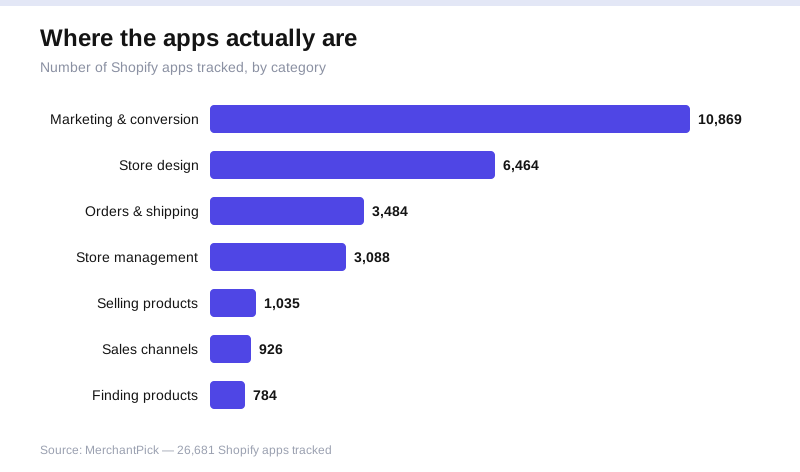
The apps are not spread evenly, either. Look at how the 26,681 break down by category and you see where the pressure sits, and where beginners lose weeks.
The catalog is lopsided, and that tells you where the trouble is
Here is the split across MerchantPick's seven categories. Marketing & conversion: 10,869 apps. Store design: 6,464. Orders & shipping: 3,484. Store management: 3,088. Selling products: 1,035. Sales channels: 926. Finding products: 784.
Marketing alone is bigger than the bottom five categories combined. It holds more than 40% of every app on the platform. Store design adds another 6,464 on top. So two categories account for roughly 17,300 of the 26,681 apps you could theoretically install, and they happen to be the two a brand-new store understands the least.
That lopsidedness is not neutral. A crowded category is a category where every product looks similar, every landing page promises the same lift, and the reviews blur together. The size is a signal of how hard the choice is, not how much you need. Finding products has 784 apps and most new stores can ignore the category entirely for months. Marketing has 10,869 and new stores treat it as the first stop. Backwards.
Why the big categories eat beginners alive
Picture the first week. You install a theme, you add a couple of products, and then you go looking for growth, which sends you straight into the 10,869-app marketing pile. Email, popups, upsells, loyalty, reviews, SMS, countdown timers, exit intent, bundling. Each one has a free tier, a five-star average, and a case study.
So you install four. Then six. Each adds a script to your storefront, a dashboard you will never check again, and a settings panel you half-configured. Your homepage now loads slower, two popups fight over the same visitor, and you have spent nine hours choosing marketing tools for a store that made zero sales, because there was no traffic yet to market to.
That is the trap, and the numbers set it. A category with 10,869 options guarantees decision fatigue. You cannot compare 10,869 of anything. You compare the first eight you see, which are the eight with the biggest ad budgets, and you convince yourself the comparison was thorough. Over-installing is not a symptom of ambition. It is what happens when a beginner meets a category too large to reason about.
You can build a real stack without paying, which makes restraint easy
65% of the apps MerchantPick tracks offer a free plan. Nearly two-thirds. That number cuts two ways.
The good way: a new store can assemble a genuinely capable setup and pay nothing while it validates whether anyone wants the product. There is no financial reason to launch with a stripped storefront.
The dangerous way: free is exactly what removes the friction that would otherwise stop you. If every install cost twenty dollars a month, you would install three apps and think hard about each. Because 65% are free, the cost of adding a seventh, eighth, ninth app feels like zero. It is not zero. The cost is on your storefront's speed, your own attention, and the tangle you will have to unpick in three months when you finally look at what is actually running. Free plans are a reason to be selective, not a reason to grab everything that does not charge.
The short stack a new store actually needs
Here is a defensible starting set. Six slots, most fillable from the 65% that cost nothing.
One, a theme or a design app that makes the store look intentional. This lives in Store design, the 6,464-app category. You need one good choice, not a collection.
Two, one email app from the marketing category. One. Out of 10,869 you pick a single tool that captures addresses and sends a welcome sequence. That is the entire marketing stack for a store with no traffic.
Three, reviews or social proof, so the first buyers see the store is real. Also marketing, also one app.
Four, something in Orders & shipping (3,484 apps) if you ship physical goods, to print labels and set rates. Skip it if you sell digital.
Five, one Store management app (3,088 available) only if you have a specific job for it, like bulk editing or backups. Otherwise leave the slot empty.
Six is deliberately blank. Keep one open slot as a reminder that the next install should have to justify itself.
Notice what is missing. Nothing from Finding products (784) unless you dropship, nothing from Sales channels (926) until you have proven demand on your own store first, no second or third marketing app. Four to six apps, and a store that loads fast and does the job.
How to choose inside a category of 10,869
When you do have to pick from a giant category, stop trying to find the best app. In a pool of 10,869 there is no single best, and the search for it is the time sink. Do this instead.
Name the one job first. Not "marketing" but "collect emails at checkout and send a welcome message." A precise job shrinks 10,869 candidates to a handful, because most of the category does something else.
Then filter to the free plans, which is 65% of the field, and read what the free tier actually includes rather than the headline. Free with a 200-contact cap is a real constraint you want to know now.
Then check load impact and support responsiveness before you check features. A new store's enemy is a slow storefront and an app whose developer went quiet, not a missing feature you would not have used. Pick one, install it, and close the tab. The other 10,868 are not going anywhere, and you can revisit when you have a reason the current app cannot serve.
The rule that survives all 26,681
If you remember one thing from the 26,681 apps in the catalog, make it this: the size of a category is a warning, not a shopping list. Marketing's 10,869 apps and Store design's 6,464 are the crowded rooms where beginners spend the most time and add the most bloat, and they are the two categories a new store is least equipped to judge.
Start with four to six apps, lean on the 65% that are free to keep launch costs at zero, and leave the marketing arms race until you have traffic worth marketing to. A lean store that ships beats a heavy store that stalls in a settings panel. The apps will still be there when you actually need them. All 26,681.


